
Drawing the tag is only step one. What you do between now and the season opener is what separates a great hunt from a memorable one

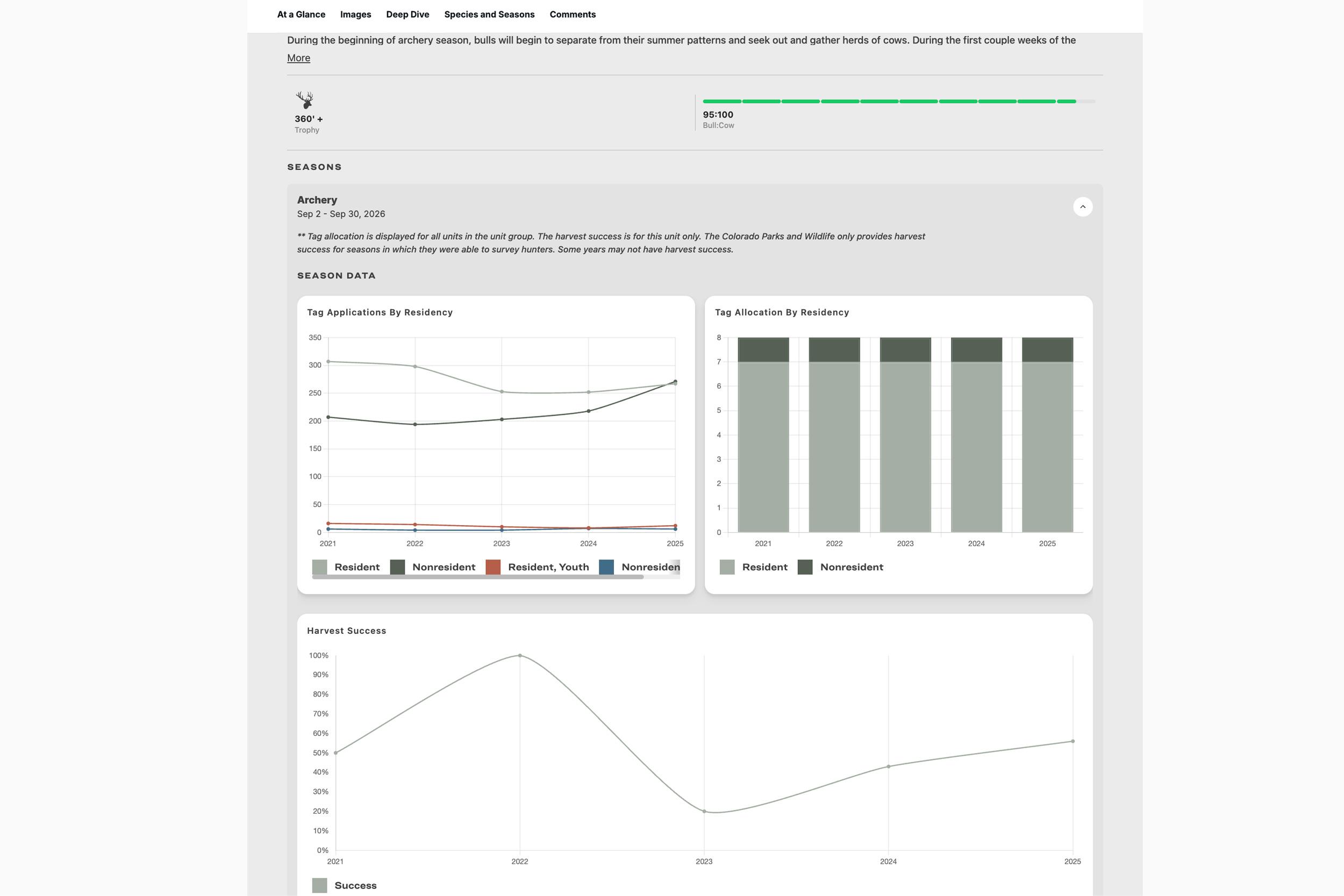
An example of some of the data that you can find on a GOHUNT Unit Profile.
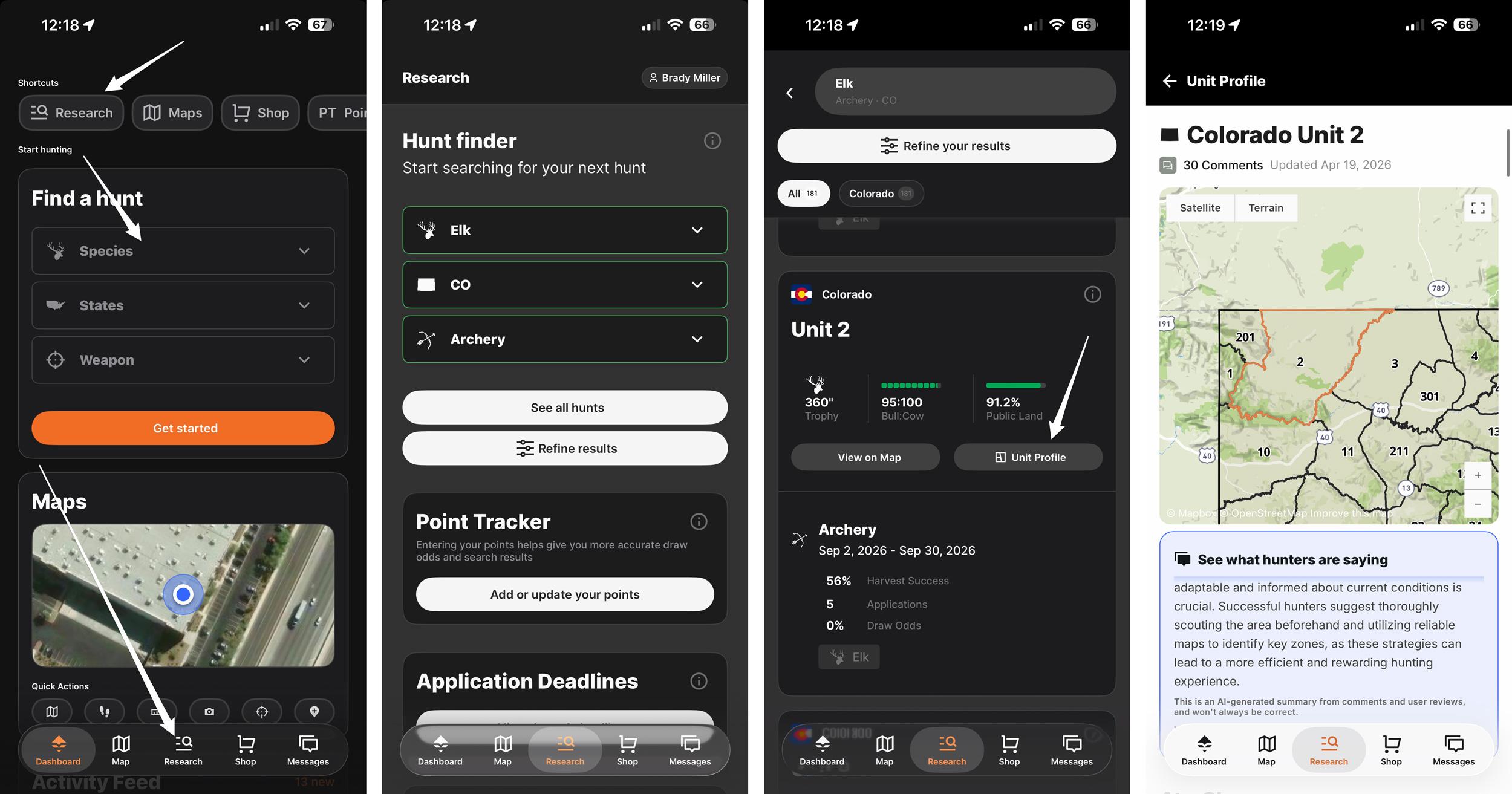
Accessing a Unit Profile on the GOHUNT mobile app.
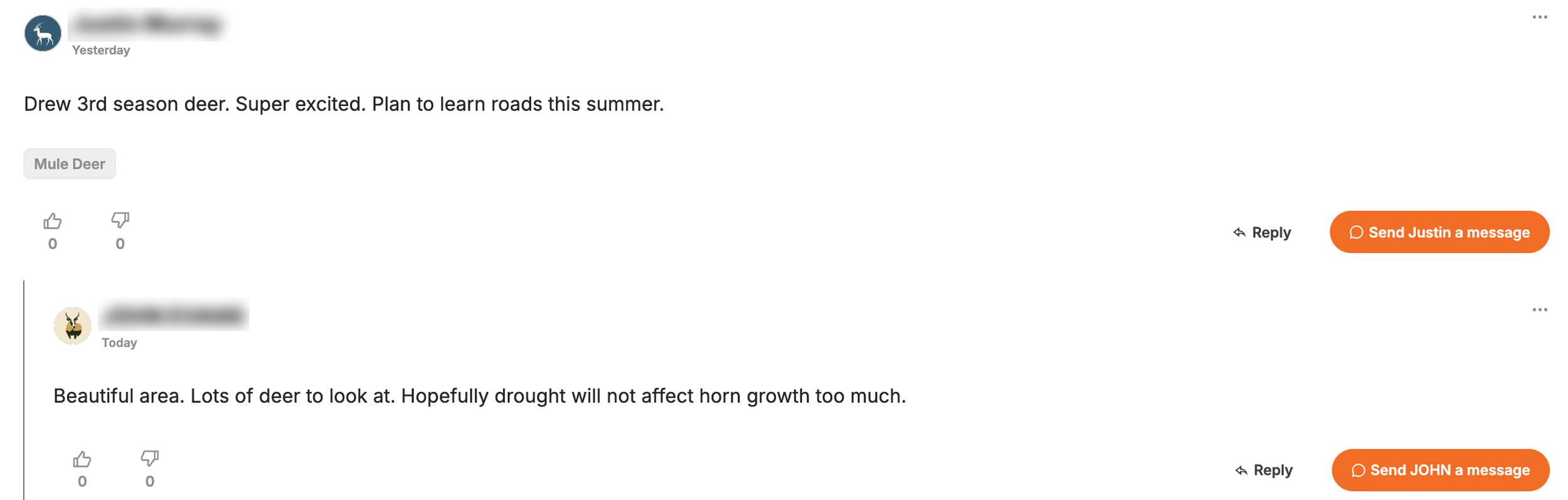
GOHUNT Unit Profile comment and direct message feature.
If you just drew a Colorado deer or elk tag, I tip my hat to you. Big congrats! So if you drew a tag, the work starts now. It starts today. Not next week, today. And continues every day until your hunt starts.
Whether you burned a stack of preference points for an archery elk unit or you're holding a rifle mule deer tag after years of waiting, there's no feeling quite like it. Colorado is one of the crown jewels of western big game hunting. The state holds some of the most diverse elk and mule deer habitat in the entire West. But the puzzle is deep, and the opportunity is real.
In my opinion, the hunters who consistently punch tags on bucks and bulls aren't just lucky — they're prepared. They've done the work. They've studied the maps, dug into the data, and shown up ready to execute.
Let me walk you through exactly how I'd approach post-draw research if I were holding your tag.
The very first thing I do after drawing any tag is head straight to the Unit Profiles on GOHUNT. Colorado's Game Management Units (GMUs) vary wildly in character, and the Unit Profile is your single best starting point for understanding the unit you drew. Now, I seriously hope you know what you're getting into before you applied, but either way, now is the time for a little refresher on what you're going to expect to find in the unit, or group of units, you can hunt.
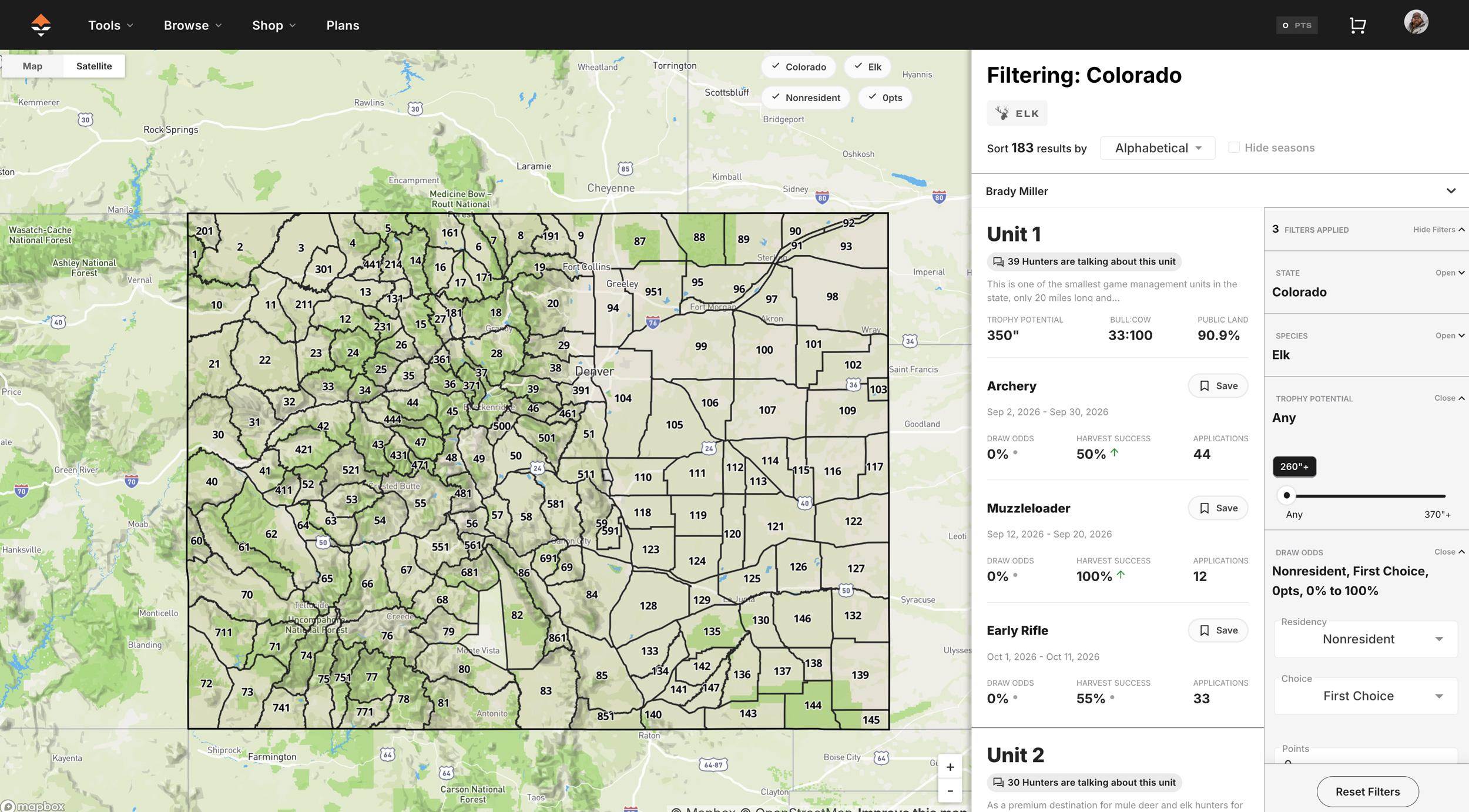
So if you're an Insider member, jump over to the Unit Profile from our Filtering research tool.
You can navigate to your specific units in several ways, both on a computer and through the research section of our mobile app.
Here's what you'll find inside a Colorado Unit Profile:
I can't stress this enough: spend time checking out Unit Profiles before you do anything else. It sets the table for everything that follows.
Here's something that a lot of hunters don't take full advantage of: GOHUNT Insider is a community, not just a research tool. I fully believe that!
One of the most powerful features on the platform is the ability to send direct messages to other GOHUNT Insider members. Think about what that means; you have access to a network of serious hunters across the country, many of whom have boots-on-the-ground experience in the exact unit you drew.
The intel you can gain here is invaluable. These are things you'd never find in a harvest report or on a topographical map. Trail conditions, specific drainages that held animals during certain weather patterns, which access roads were passable in the unit, and which ones washed out... that kind of ground-level knowledge is priceless.
Don't be shy about reaching out. The hunting community can be generally generous with information when you approach people respectfully. Introduce yourself, tell them what you drew, and ask if they'd be willing to share any general insights. You'll be surprised how often fellow hunters are happy to help. And don't forget, to help people back!
A few things worth knowing about the messaging system:
Every Unit Profile on GOHUNT has a comment section, and this is another goldmine. These comments are often packed with intel from hunters who have recently been in the unit. Think recent scouting observations, notes on road conditions, stories, and photos from past seasons, and much more.
If you haven't scrolled to the bottom of a Unit Profile in a bit, we've totally enhanced the comment sections, and here's what you can now do:
Before you finalize your scouting plan, read through every comment on your unit's profile. And after your hunt, pay it forward by leaving a comment sharing what you learned. That's how this community gets better for everyone.
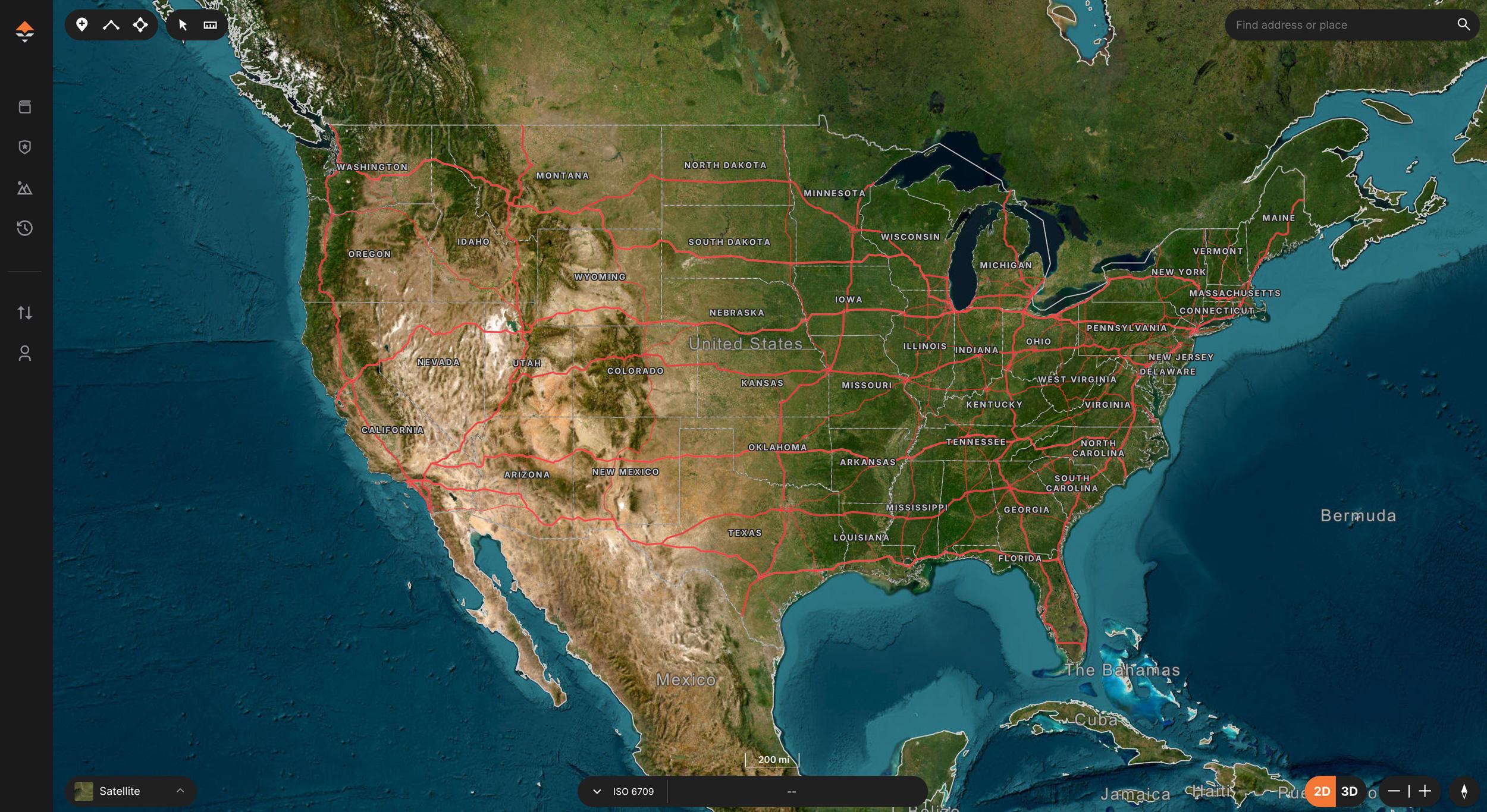
Once you've got a feel for the unit from a macro level, it's time to get into the weeds with GOHUNT Maps. This is where post-draw research really gets fun.
Colorado is a massive state with a ton of public land, but not all public land is created equal. Using GOHUNT Maps, you can:
When I'm e-scouting a Colorado unit, I'm building a mental picture of the landscape long before I ever set foot on it. I'm identifying multiple spots; not just a Plan A, but a Plan B and C as well. Having flexibility built into your e-scouting plan is everything. GOHUNT Maps includes a proprietary, detailed topographical map, but the real power comes from combining it and satellite imagery with the Terrain Analysis Tool. Together, these let you dissect your unit at a level that would have required multiple scouting trips just a few years ago.
Tip: Pay close attention to water sources, especially if you're hunting elk in September or early deer seasons. In dry years, water is the great equalizer. Use the mapping layers to find springs, ponds, and creek drainages — then cross-reference with the terrain to understand how animals are likely to travel between bedding, water, and feed.
I love maps. And if you're not using the Terrain Analysis tool on GOHUNT Maps, you're missing out. Terrain Analysis takes the guesswork out of e-scouting by allowing you to highlight areas within your unit.
Think of it this way: your unit might cover thousands of acres. Terrain Analysis helps you identify which drainages, ridgelines, or basins are worth your limited scouting and hunting time, and potentially which ones you can skip.
For Colorado specifically, I use Terrain Analysis to:
Combine Terrain Analysis with the Maps layers, and you're building a legitimate game plan before you ever leave home.
Check out these great articles for more information about the Terrain Analysis tool:
This one isn't GOHUNT-specific, but it's too important to skip. Call or email your local CPW wildlife officer or biologist for your unit. These are the people on the ground. They know the herd better than anyone, from current population estimates, migration patterns, how last year's winter affected the animals, whether there's been any disease pressure, and where the herds have been spending time.
Most biologists and officers are genuinely happy to talk to hunters who have done their homework and ask thoughtful questions. Use your GOHUNT research to inform those questions, and you'll walk away with insights that no database can replicate.
Check out these two articles for more information when asking a biologist:
Colorado hunting is not a casual undertaking. Whether you drew an alpine mule deer tag or an elk unit, the terrain demands preparation. If you're doing a backcountry pack-in hunt — which I'll always advocate for when the unit allows it — you need to be honest with yourself about your physical fitness and your gear.
Start your conditioning now. The biggest mistake hunters make after drawing a tag is waiting until the month before the season to start getting in shape. Rucking with a loaded pack, hiking elevation, and building your cardiovascular base takes time. The mountains will humble you fast if you're not ready.
Dial in your gear list:
I've been talking about a lot of GOHUNT tools in this article that you can access if you're an Insider member. And if you want even more intel, you can sign up or upgrade to our GOHUNT Insider+ membership.
In my opinion, Insider+ is the single best investment a serious Western hunter can make. Here's what you get:
For hunters who want more than just access to research tools, Insider+ is the upgrade that turns hunt planning into a true turnkey service. Insider+ members get access to one-on-one consultations with GOHUNT's team of hunting consultants.
Instead of tracking deadlines, sorting through state-by-state application rules, and trying to build a strategy on your own, you get a designated GOHUNT advisor who helps map out your goals, walks you through onboarding, and handles the application process in the states you choose. The value is simple: you stay in control of where you want to hunt, and GOHUNT helps ensure the details are handled correctly and on time, so you can move through application season with more confidence and far less stress.
What makes Insider+ especially compelling is that it does not stop at submitting applications.
Once a tag is drawn, members also get one-on-one e-scouting and mapping guidance, plus customized gear recommendations built around their specific hunts. In other words, Insider+ pairs GOHUNT’s premium tools—Draw Odds, Filtering, Unit Profiles, and GOHUNT Maps—with real human expertise, giving hunters a higher-touch experience from planning to execution. For someone considering the upgrade if they are already an Insider member, or even someone who doesn't currently have an Insider membership, the appeal is clear: fewer missed deadlines, less guesswork, and a more streamlined path from “I want to hunt this year” to having a real plan in place.
You spent years accumulating preference points for this tag, the tag is in hand, and the clock is ticking. Don't leave your preparation up to chance. Insider+ gives you every tool, every data point, and every community connection you need to walk into Colorado with a real game plan.
Before I wrap this up, here's a practical checklist of Colorado-specific prep items to knock out before your season:
Colorado is special. The mountains are big, the country is wild, and the animals that call it home are as impressive as any in the West. Whether you're chasing a 300"+ bull through the aspens or trying to find a 180"+ mule deer buck, the opportunity is there if you've done your homework.
Use the tools. Dig into the data. Connect with the community. And when the moment arrives, be ready to execute.
Good luck this season.
Ready to start preparing for your Colorado hunt? If you're not already an Insider, start a free trial and leave nothing to chance.
Filtering on the web: This is probably my go-to route.
You can also jump into the GOHUNT mobile app and access a Unit Profile by using the "Research" tab.
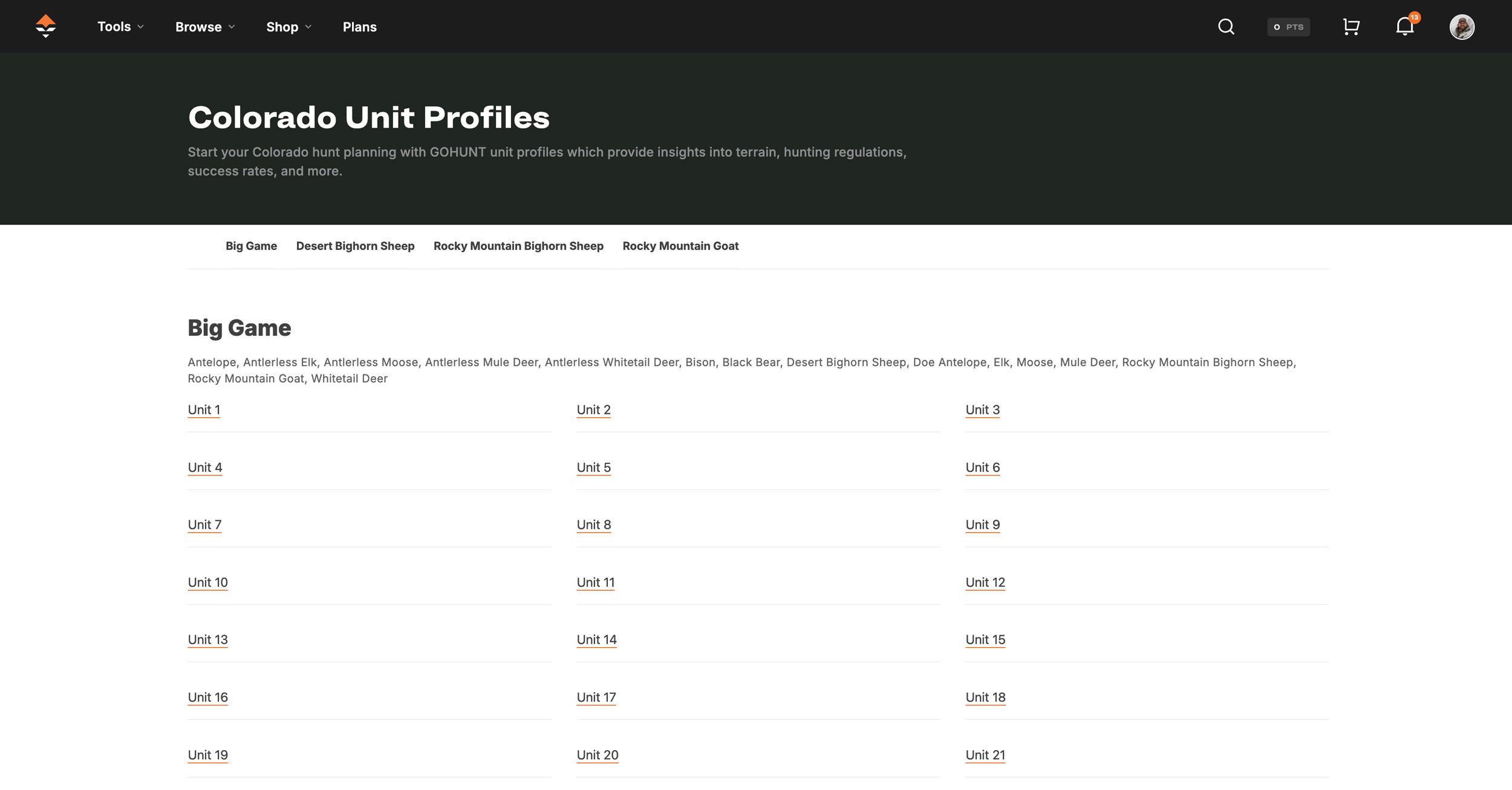
Another way is through our state list of every unit. You can access this on a computer by going to Tools > Unit Profiles > Select Your State. So on a computer, if you highlight the "Tools" dropdown, the "Unit Profile" section will appear on the right. Scroll down and click your state.
Full hunt unit breakdown: Terrain photos from the unit, vegetation breakdown, historical temperatures and precipitation data, and weapon/season-specific insights. Before you put boots on the ground, you can get a real feel for what kind of country you're dealing with.
Harvest statistics: historical harvest data broken down by weapon type (archery, muzzleloader, rifle) and season. This tells you how many animals are harvested annually and provides a realistic baseline for what to expect.
Buck-to-doe and bull-to-cow ratios: I like to look at this information. A unit with a strong buck-to-doe ratio is going to hunt differently than one with a skewed herd structure.
Hunter surveyed/density data: Knowing how many other hunters are likely to be in your unit during your season is critical for planning your hunt. Are you going to have the backcountry to yourself, or are you going to need to push deeper to find unpressured animals? And as a deer hunter, I'll look at the "Hunters Surveyed" data we provide so I have a rough idea of how many elk hunters will be in the field at the same time as my tag.
Season dates: A very important bit of information when planning your hunt.
Access and land ownership overview: public vs. private land breakdown, so you know what you're working with before you ever open a map.
Comments from other GOHUNT members: Each Unit Profile has a comment section where members can share information, ask questions, and even post photos from the unit. This is far more reliable than a random internet forum, and the unit-specific focus makes the information directly relevant to your hunt. Learn more about our Unit Profile commenting feature
Messages are completely private: only between you and the hunter you're communicating with. They're not used for any kind of data or unit research. What you share stays between you.
Activity is consolidated in your dashboard: your comment threads, replies, and direct messages all live in one place, so you never miss a key piece of information as you're building your hunt plan.
Messages sync across devices: wherever you have service and can access GOHUNT, you have access to every conversation and piece of knowledge you've collected. You can send messages on a computer or through our mobile app.
Upload photos directly to Unit Profile comments: Think trail conditions, trail cam images, blowdown on a key access road. This is the kind of visual context that a satellite image simply can't give you. If someone posted a photo from your Colorado unit last fall, that's intel worth its weight in gold before your trip.
Tag your comments for faster searching: GOHUNT automatically suggests tags you can add to your comments, making it easier for future hunters to quickly find the specific information they're after. Looking for road condition reports or water source notes in your unit? Filters help surface exactly that.
Flag which units you've hunted: You can now mark whether you've hunted a unit and specify the season and year. This tells other users that you're a credible, firsthand source. If you've hunted a Colorado unit before, flag it. You'll help other hunters, and the platform will continue to grow better for everyone.
Reply notifications: By default, you'll now receive email notifications when someone replies to your comment. Too many good conversations were dying because hunters weren't being notified. Now the dialogue actually continues — which means more answers, more context, and more useful information for you.
View 3D terrain and satellite imagery: See ridges, drainages, cliff bands, and elevation changes to evaluate glassing locations, travel routes, potential bedding areas, and areas where deer and elk are most likely to live. If you just pan around your unit in 3D, you can map out areas you've never set foot in and those you definitely want to check out. Even if you look at a section of the unit on a map and it doesn't seem like a place you want to hunt, you can cross it, per se, but don't fully eliminate it. You never know if this will be your plan Z area where you might take the animal of your life.
Layer public/private land boundaries, unit boundaries, land ownership, trails, and burns: This is critical in any state. Toggle on the land ownership overlay and study where the public ground actually is.
Start marking waypoints for camp, glassing knobs, and access points: Build your hunt plan visually. I always develop Plan A, Plan B, and Plan C locations before the season. If road conditions change, hunting pressure shifts, or your first setup doesn't pan out, you need backup options already mapped and ready.
Topographic layers: identify the drainages, benches, saddles, and terrain features that hold animals. In Colorado mule deer country, especially, the bucks are using the landscape in very specific ways. Find the terrain, find the deer.
Historic fire layers: burns are gold for elk and deer in Colorado. New growth after a fire creates high-nutrient forage that attracts animals.
Sync everything to your phone for offline use: Once you download layers for offline use in the GOHUNT app, you take all of your e-scouting into the field even without cell service.
Spot north-facing bedding slopes: Got an elk tag? Quickly see places where elk might bed, especially in early archery seasons when temperatures are brutal.
Identify benches, saddles, and migration funnels: These terrain features are natural travel corridors.
Find the nasty, hard-to-reach pockets: In heavily hunted units, there are times when I like to use our Terrain Analysis to find the steepest, most inaccessible terrain in the unit. If it looks miserable on a topographical map, it's probably worth your time.
Pack system sized for the hunt (backcountry vs. day-hunt setups are very different)
Quality optics appropriate for Colorado's terrain — glassing is everything in my opinion
Layering system built for temperature swings
Game bags, pack-out gear, are essential
Confirm your tag details: season dates, legal shooting hours, and any unit-specific regulations (antler restrictions, weapon restrictions, etc.) in the current CPW Big Game Regulations booklet.
Check road and access conditions: Colorado's mountain roads change seasonally. Confirm which forest roads and access points will be open during your season window.
Scout in person if possible: even one or two scouting trips before the season opens will dramatically improve your odds. There's no substitute for boots on the ground intel.